Support

System Status
You can verify the iShareRadio Platform is operational by checking the status page:
Getting Help
It is important to join our iShareRadio Groups.io page to get the latest news and updates and to post questions.
For community-supported chats, join us on Discord.
See the FAQ for answers to common questions.

Posting on the forum is the best way to get help because:
- Community knowledge: Other users and community members can share solutions and workarounds
- Public visibility: Others experiencing the same issues can follow along and benefit from the discussion
- Searchable history: Forum posts create a searchable knowledge base for future reference
- Faster responses: Community members often respond quickly with helpful insights
- Collaborative problem-solving: Multiple perspectives help identify and resolve issues more effectively
Reference Networking
Flex Radio
Everyones' networking may be slightly different but there are some requirements to work with iShareRadio (iSR) Client and Flex Radio. The diagram below shows two LANs separated by the internet and Flex Radio presents either using UPnP or manual port forwarding.
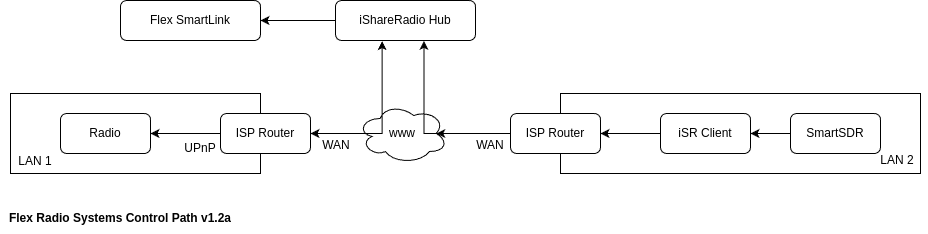
The important part is that the iSR Client should be on a separate LAN (the Operators' LAN) where SmartSDR is running and not where the Radio is running. The iSR Client, for Flex Radios, will then connect directly to the Flex Radio UPnP or manual port when instructed to via the iShareRadio Hub.
Station Controller
The iSR Client is used to proxy the Station Controller securely over the internet to the iShareRadio Hub where the user can configure and control the Station Controllers' modules.
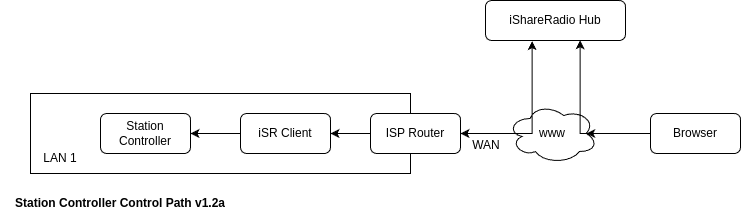
The simplest way to setup this up is to install the iSR Client Linux debian package on the raspberrypi that accompanies the Station Controller. However, any iSR Client on the same network as the Station Controller can be used.
Reporting an issue
To get the best help from our community and support team, please follow these steps:
Join the iShareRadio Groups.io forum iShareRadio group.
When creating a support post, please include the following information:
Required Information
1. Clear steps to reproduce the problem - Describe what you were trying to do - List the exact steps you took that led to the issue - Note what you expected to happen vs. what actually happened
2. Clipboard copy of the iSR Client (if applicable)
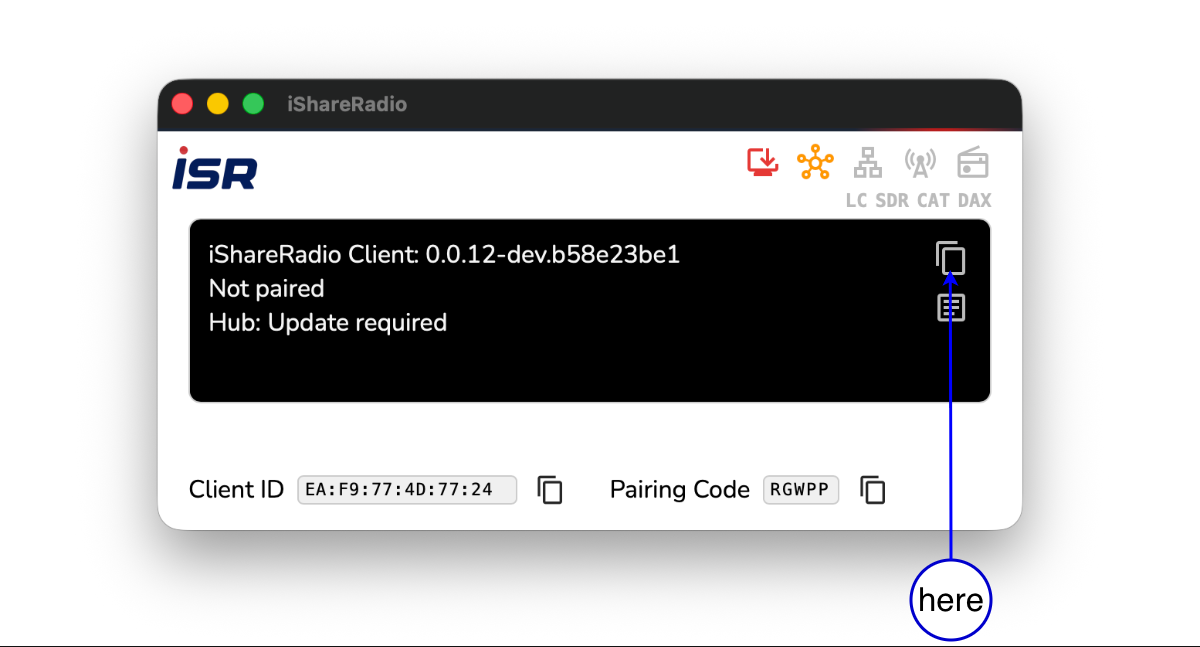
- If your issue involves the iSR Client application, use the clipboard copy feature in the iSR Client GUI
- The clipboard copy icon () appears when you hover over the info box (Component 14) in the iSR Client interface
- Click the clipboard icon to copy comprehensive status information to your clipboard
- This provides detailed diagnostic information about your client's state
- See iSR Client GUI Layout - Info Box and iSR Client Support for detailed instructions
Device IDs and Usernames
Client device IDs and usernames are crucial information to include in your support post. The clipboard copy from the iSR Client includes your device ID, and you should also include your username. Everything in the iShareRadio system operates around usernames and device IDs, so this information is essential for troubleshooting and identifying your specific devices and account.
Be clear about which device ID is which: When providing device IDs, clearly specify the device type for each ID (e.g., "iSR Client Device ID: EA:F9:77:4D:77:24" or "Radio Device ID: ..."). This helps support quickly identify which devices are involved in your issue.
3. Version information from the Hub web page (if applicable) - If your issue involves the Hub web interface, include the version information - This can typically be found in the footer or about section of the Hub website
4. Screenshots - Include screenshots showing the problem - Screenshots of error messages, unexpected behavior, or relevant interface elements - Annotate screenshots if needed to highlight the issue
Security and Privacy
Never post credentials or personal information on the public forum. This includes: - Passwords - API keys or tokens - Personal email addresses (other than your own for contact) - Account numbers or sensitive identifiers
If your problem is related to user profile, credentials, login, or account access issues, please contact us directly at support@ishareradio.com instead of posting on the forum.
Support Post Template
Copy and paste the following template into your Groups.io post, filling in the relevant sections:
**Issue Title:** [Brief description of the problem]

**Steps to Reproduce:**
1. [Step 1]
2. [Step 2]
3. [Step 3]
[Add more steps as needed]

**Expected Behavior:**
[Describe what you expected to happen]

**Actual Behavior:**
[Describe what actually happened]

**Frequency:**
[ ] Once (happened one time)
[ ] Always (happens every time I try to reproduce it)
[ ] On demand (happens when I perform specific actions or under certain conditions)

**iSR Client Information:**
[Paste clipboard copy from iSR Client here, if applicable. This includes your device ID and other crucial diagnostic information. The clipboard copy contains all the essential details needed for troubleshooting. If you're reporting issues with multiple devices, clearly label which device ID belongs to which device type (iSR Client, Radio, Station Controller, etc.).]

**Hub Version Information:**
[Paste version information from Hub web page here, if applicable]

**Screenshots:**
[Attach or link to screenshots showing the issue]

**Additional Context:**
[Any other relevant information, such as:
- When did this issue first occur?
- Have you made any recent changes to your setup?
- Operating system and version
- Browser information (if Hub-related)
- Any patterns you've noticed (time of day, specific actions, etc.)
]
VPN, CGNAT, and UDP discovery
If you use a VPN while operating, or connections fail with red LAN/cell icons, see VPN, CGNAT, and UDP discovery troubleshooting. It explains full- vs split-tunnel VPN, why Broadcast Network Interface is for local bind (not disabling VPN), and UDP broadcast limits.
Additional Resources
- VPN, CGNAT & UDP troubleshooting: VPN + remoting, CGNAT, and LAN discovery
- macOS iSR Client install (DMG): Step-by-step Mac install for beginners
- iSR Client GUI Layout: Understand status indicators and gather diagnostic information
- iSR Client Support: Learn how to gather support information from the iSR Client
- Documentation Index: Browse all available documentation