Installation
The iSR Client is used to proxy one or more Station Controllers on a local network to the iShareRadio Hub. Once proxied and paired to an Operator on the Hub, the Station Controller can then be controlled, managed and integrated with alerting and metrics.
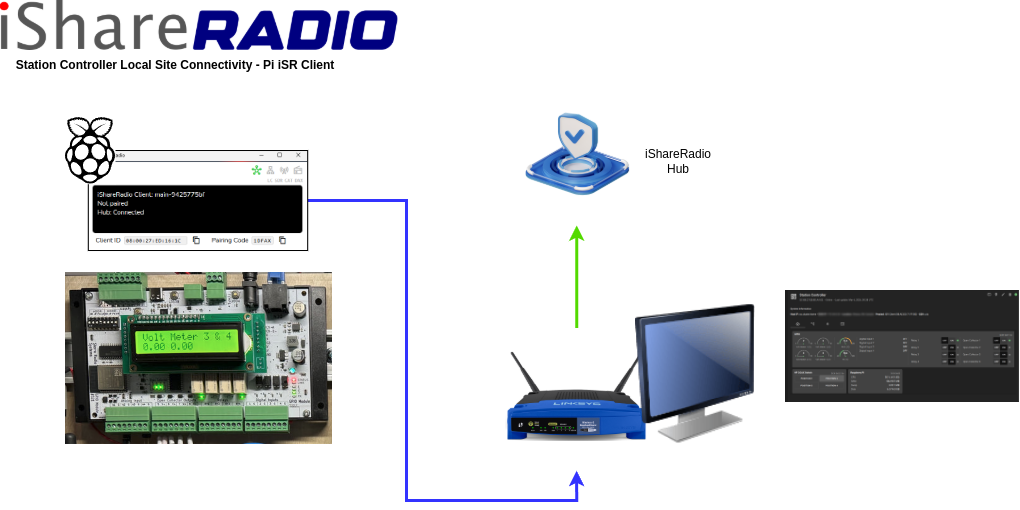
Blue: LAN, Green: WAN
The iSR Client can be installed on the Station Controller RaspberryPi or elsewhere so long as it can reach the Station Controller over the network. The simplest approach is to install it on the RaspberryPi.
How the Proxy Works
The iSR Client is a secure, intelligent proxy for the Station Controller. It is responsible for communicating with the Station Controller modules, understanding their configuration, controlling various switches, relays and collecting readings. The Hub does not directly connect to the Station Controller and waits for the iSR Client to send status and reading information. The Hub can also send instructions to control and set various features on the modules.
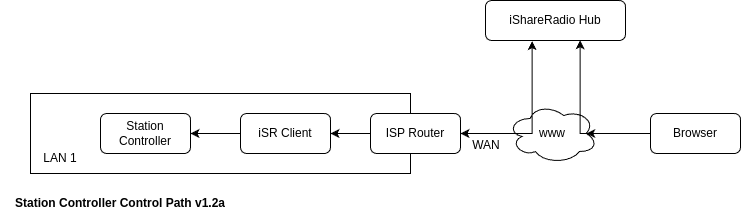
The Operator must pair the iSR Client responsible for proxying the Station Controller first, then pair (add device) Station Controller.
iSR and NodeRed
When an iSR Client is managing a Station Controller, it will connect to the RaspberrpyPi and disable NodeRed permanently. If you require Node Red to be running you must disable iSR Client and restart the Node Red systemd service.
sudo service stop isr-client
sudo systemctl disable isr-client
sudo systemctl enable nodered
sudo service start nodered
Installing iSR Client on Station Controller
The debian installer will perform the following actions...
- Install the isr-client executable
- Install a systemd service that runs the isr-client as a service.
- Install a systemd service that checks for updates from the iSR Client release server and install new versions automatically.
Requirements: Raspbian OS with Python 3.7+
Installation Steps
- Download the RaspberryPi debian package from the Hub Software Tab to your computer.
- Copy this over to the RaspberryPi (eg: /home/sierra/).
- Log into the RaspberryPi using SSH (ssh sierra@your-station-controller-ip and install the debian package).

Example Debian package installation
Selecting previously unselected package isr-client.
(Reading database ... 136072 files and directories currently installed.)
Preparing to unpack isr-client-main-raspberrypi-arm64-d881b3f69.deb ...
Adding group `isr-client' (GID 124) ...
Done.
adduser: Warning: The home dir /var/lib/isr-client you specified can't be accessed: No such file or directory
Adding system user `isr-client' (UID 113) ...
Adding new user `isr-client' (UID 113) with group `isr-client' ...
Not creating home directory `/var/lib/isr-client'.
Unpacking isr-client (0.main.20260413210735.d881b3f69) ...
Setting up isr-client (0.main.20260413210735.d881b3f69) ...
Created symlink /etc/systemd/system/multi-user.target.wants/isr-client.service -> /lib/systemd/system/isr-client.service.
ISR Client systemd service has been enabled and started.
ISR Client release updater timer enabled (daily 06:00 UTC).
To check service status: sudo systemctl status isr-client
Configuration: /etc/isrclient.conf (logging settings)
Service logs: sudo journalctl -u isr-client -f
To disable automatic startup: sudo systemctl disable isr-client
Release updater: sudo systemctl status isr-client-updater.timer
(disable: sudo systemctl disable --now isr-client-updater.timer)
ISR Client has been installed successfully.
You can now run 'isr-client' from the command line or find it in your applications menu.
Processing triggers for gnome-menus (3.36.0-1.1) ...
Processing triggers for mailcap (3.70+nmu1) ...
Processing triggers for desktop-file-utils (0.26-1) ...
Check the ISR Client Version
~ $ isr-client --console --version
version=main-d881b3f69
git_sha=d881b3f69
release_train=main
device_id=B8:27:EB:8D:AA:0E
Check the system service is running
* isr-client.service - ISR Client - Amateur Radio Internet Sharing Service
Loaded: loaded (/lib/systemd/system/isr-client.service; enabled; preset: enabled)
Active: active (running) since Tue 2026-04-14 05:44:07 PDT; 7min ago
Docs: https://docs.ishareradio.com/isr-client/installers/debian
Main PID: 2684 (isr-client)
Tasks: 9 (limit: 760)
CPU: 4.433s
CGroup: /system.slice/isr-client.service
`-2684 /usr/bin/isr-client --console
Apr 14 05:44:10 stationcontroller isr-client[2684]: Version main-d881b3f69 o d881b3f69 beta linux Debian GNU/Linux 12 (bookworm) (6.6.51+rpt-rpi-v>
Apr 14 05:44:10 stationcontroller isr-client[2684]: Raspberry Pi: Raspberry Pi 3 Model B Plus Rev 1.4
Apr 14 05:44:10 stationcontroller isr-client[2684]: === Device Information ===
Apr 14 05:44:10 stationcontroller isr-client[2684]: Device ID: B8:27:EB:8D:AA:0E
Apr 14 05:44:10 stationcontroller isr-client[2684]: Connecting to hub server...
Apr 14 05:44:10 stationcontroller isr-client[2684]: ==========================
Apr 14 05:44:10 stationcontroller isr-client[2684]: Console mode active. Press 'q', 'quit', or 'exit' to shutdown gracefully, or use Ctrl-C.
Apr 14 05:44:11 stationcontroller isr-client[2684]: Registered B8:27:EB:8D:AA:0E 8DDG8
You can check the isr-client is running by opening its webserver status page...
http://your-station-controller-ip:8123

Running Console Mode Manually
If you want to run the isr-client on a headless linux computer then you can use the --console flag. This is useful for troubleshooting or running the isr-client on demand. Ensure you have stopped and disabled the systemd isr-client service beforehand.
_ ____ _ ____ _ _
(_) / ___| | |__ __ _ _ __ ___ | _ \ __ _ __| | (_) ___
| | \___ \ | '_ \ / _` | | '__| / _ \ | |_) | / _` | / _` | | | / _ \
| | ___) | | | | | | (_| | | | | __/ | _ < | (_| | | (_| | | | | (_) |
|_| |____/ |_| |_| \__,_| |_| \___| |_| \_\ \__,_| \__,_| |_| \___/
Version main-d881b3f69 o d881b3f69 beta linux Debian GNU/Linux 12 (bookworm) (6.6.51+rpt-rpi-v8) arm64
Raspberry Pi: Raspberry Pi 3 Model B Plus Rev 1.4
=== Device Information ===
Device ID: B8:27:EB:8D:AA:0E
Connecting to hub server...
==========================
Console mode active. Press 'q', 'quit', or 'exit' to shutdown gracefully, or use Ctrl-C.
Registered B8:27:EB:8D:AA:0E X15Q9
Logs
For debian installation the isr-client will log to $USER/.ishareradio/ when run manually from the console and /var/log/ishareradio/ when run as a systemd service.