SmartLink
Flex Smartlink has two ways of connecting the radio "Automatic" (UPnP) or "Manual" (Port Forwarding).
flowchart LR
    R[Flex Radio] <--> WAN[WAN / Internet]
    WAN[WAN / Internet] <--> SD[SmartSDR]
Use SmartSDR on the same LAN as the radio while you set Automatic or Manual in SmartLink; after the WAN path is working, remote SmartSDR connects over the Internet as shown.
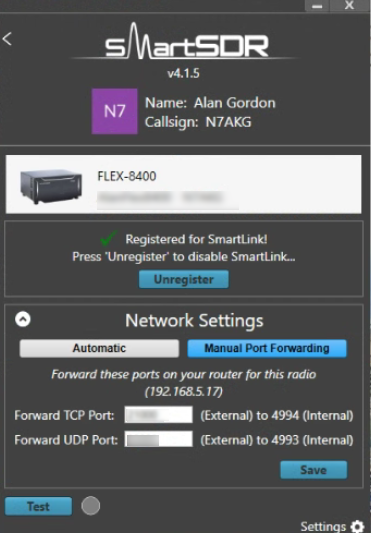
Manual - Port Forwarding
This is the most reliable way to ensure the TCP and UDP ports of the radio are online. For the "WAN" connections, they use TLS-encryption to setup the control path so it is secure.
To setup manual port forwarding you must configure the "Manual" mode and then ensure the router connected to the radio forwards these ports to the ISP Router WAN interface.
Automatic - UPnP
The UPnP approach is very simliar to manual port forwarding except the UPnP protocol will create the port forwarding for the radio without any intervention. The UPnP protocol though can be stopped by "double NATs" or more aggressive firewalling and internal networking.
iSR Client in the Mix
Using iShareRadio to remotely control a Flex Radio, the iSR Client site son the WAN side, usually on the same computer as the SmartSDR client.
flowchart LR
    R[Flex Radio] <--> WAN[WAN / Internet]
    WAN[WAN / Internet] <--> iSRClient
    iSRClient <--> SD[SmartSDR]
The iSR Client will be using the SmartLink credentials and port information to connect on behalf of the Operator who will not see or use those credentials.