License Control
iShareRadio includes license control to help keep remote operation inside the band / mode / power privileges for the operator’s license, taking into account where the transmitter (radio) is physically located.
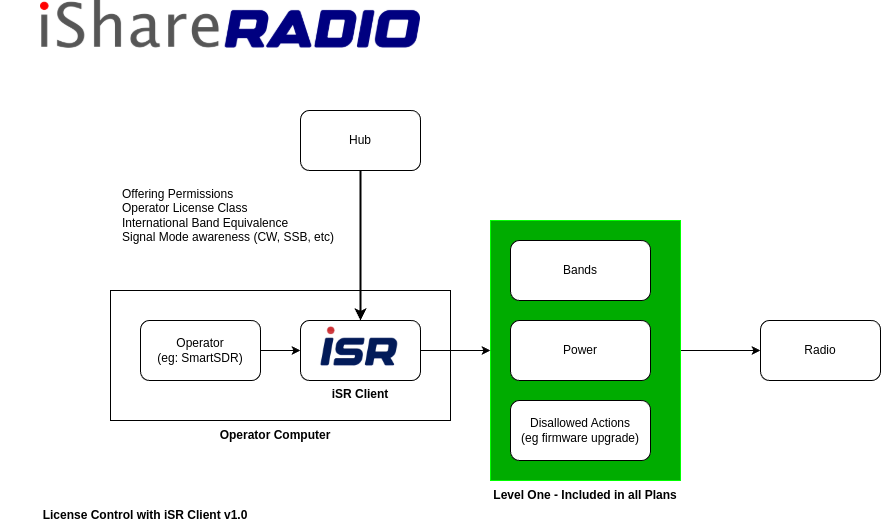
This feature is designed to work automatically during normal use (connecting to radios, using marketplace offers/bookings), as long as your profile information is complete.
What it does for you
- Band plan enforcement: the system determines what frequency ranges you may transmit on for the current operating scenario.
- Mode-aware limits: band plan entries can be restricted to a signal mode (e.g., CW, SSB, FM, or ALL).
- Power limits: band plan entries include a maximum transmit power (watts) for that band segment and license class.
- Cross-country license equivalency: if the operator and transmitter are in different countries, the platform maps your license class to an equivalent license class in the transmitter’s country before selecting the applicable band plan.
- Offer-aware restrictions (marketplace): when you are operating under an active offer/booking, the system can further restrict the allowed bands/power using the offer’s configured limits (on top of your legal privileges).
What you need to set up (end user)
License control depends on two pieces of user-provided information and one device-provided (or user-confirmed) location input.
- Your country: set in your user profile (stored as a 2-letter ISO country code, e.g.
US,CA,GB). - Your license class: set on your active callsign (your default/active callsign is what the system uses for license class).
- The license-class dropdown options are country-specific (when you pick a country, the hub loads the valid license classes for that country).
- Callsign records are user-managed; adding/editing a callsign does not automatically validate your license with a government registry unless you explicitly trigger a “refresh” feature (when available).
- Radio (transmitter) country: derived from device location data (GeoIP and/or user-reported location). If the radio’s country cannot be determined, license control cannot compute privileges for that device.
How it behaves in common situations
- Operating a radio in your home country: your license class is applied directly to that country’s band plan.
- Operating a radio in another country: your license class is first mapped through a license equivalence table to an equivalent class in the transmitter’s country, then that country’s band plan is applied.
- Operating under an offer/booking: the final allowed band segments can be further narrowed by the offer’s restrictions (for example, if the offer limits you to a narrower band segment or lower power than your license would allow).
If something is missing or misconfigured
License control is strict about required inputs. If the platform can’t compute privileges, you may see errors such as:
- Country not set: you need to add your country to your profile.
- License class not set: you need to set the operator class on your active callsign.
- Radio location unavailable: the device has no usable country/location data; you may need to update the device’s location information.
- No band plan / equivalence data: the system doesn’t have the required tables for that country/license combination (this is an administrative data issue).
What “license control” is (and isn’t)
- It is: an automated way for iShareRadio to determine and enforce band/mode/power boundaries based on your stated license and the transmitter’s country.
- It isn’t: a substitute for your responsibility as the operator. You are responsible for ensuring your profile license information is accurate and that your operation complies with applicable regulations.