Client Info Page (port 8111)
Every iSR Client exposes a local web page on port 8111. Use it to check whether the client is running, paired, and talking to the Hub—especially on a headless computer with no GUI, such as a Raspberry Pi or a Station Controller Pi.
On the same computer as the client:
From another computer on the same LAN, use the client's IP address:
http://<client-ip>:8111
If the client has a GUI, you can also open this page from the Status Webpage icon. See iSR Client GUI Layout.
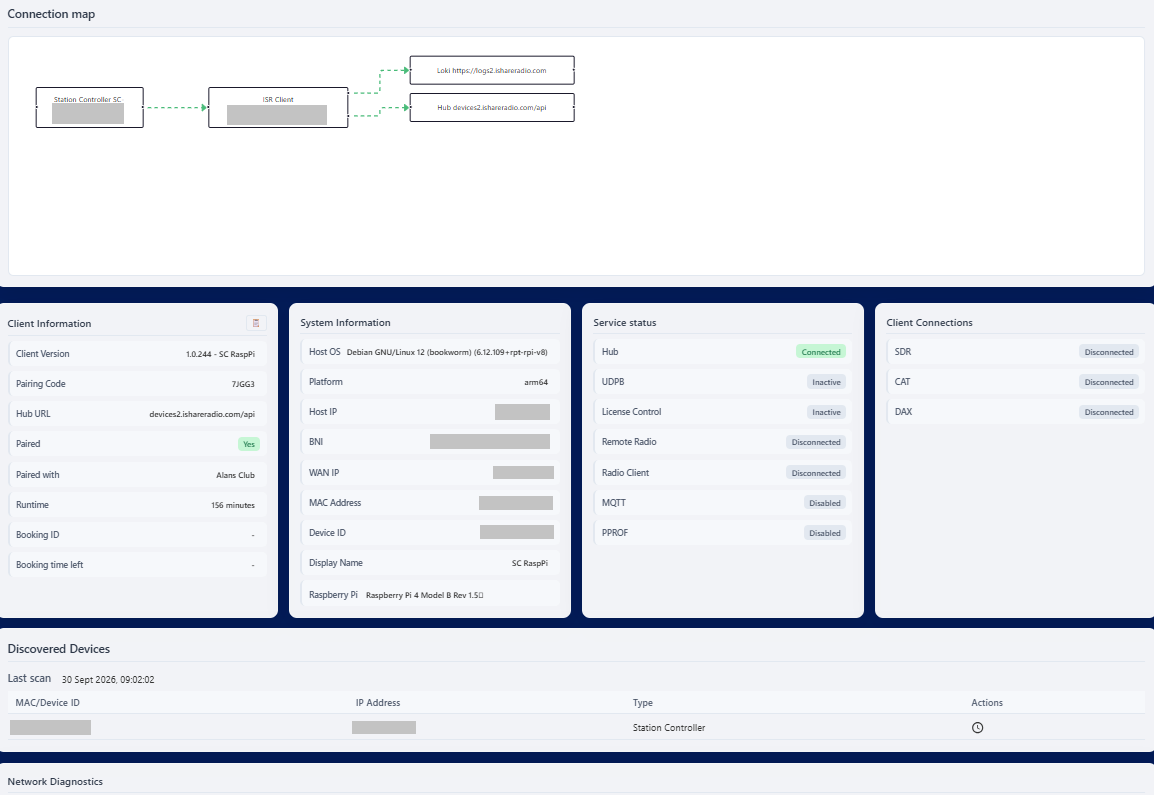
The page shows:
- A connection map of how this client reaches the Hub and any proxied device, such as a Station Controller
- Client information — version, pairing code, Hub URL, whether it is paired, runtime, and current booking
- System information — OS, IP addresses, device ID, and display name
- Service status — Hub, license control, radio, MQTT, and related services
- Client connections — SDR, CAT, and DAX
- Discovered devices on the LAN
- Network diagnostics
If this page does not load, the client is not running or you are not on a network that can reach that host. See Platform installers for how to start the client on each OS.